Other
Ownership Verification
Prove that you control a SaaS assessment target domain.
Ownership Verification
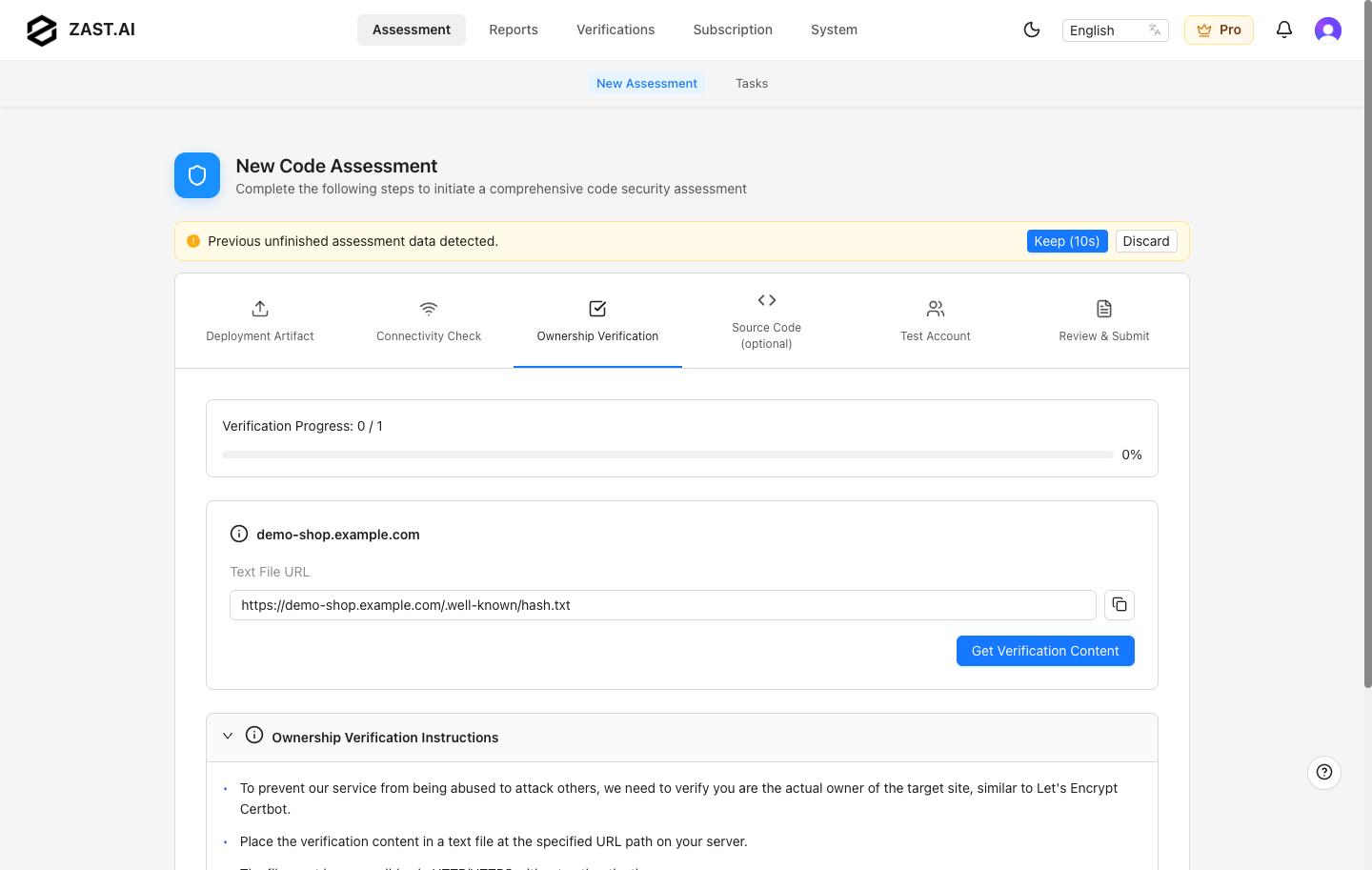
SaaS assessments require ownership verification before ZAST.AI can assess a target domain. This prevents unauthorized users from submitting assessments against services they do not control.
Ownership verification appears after Connectivity Check in the SaaS assessment flow.
How It Works
- ZAST.AI generates a verification file name and verification content for the target domain.
- You publish that content under the required
/.well-known/path on the same domain. - ZAST.AI fetches the URL from the SaaS environment.
- When the content matches, the domain is marked as verified and you can continue the assessment.
The verification content is temporary. If it expires, regenerate the content from the ownership verification step and replace the published file.
Required URL
If your target service is:
https://demo-shop.example.com/api/v1
the verification file must be reachable from the domain root, for example:
https://demo-shop.example.com/.well-known/hash.txt
Use the exact file name and exact content shown in the ZAST.AI UI. Do not add HTML markup, quotes, comments, or extra lines.
Nginx Example
Place the verification file under a directory served by Nginx:
mkdir -p /usr/share/nginx/html/.well-known
printf '%s' 'zast-generated-verification-content' > /usr/share/nginx/html/.well-known/hash.txt
Add a location block if your existing reverse proxy does not serve static files from /.well-known/:
server {
    server_name demo-shop.example.com;

    location = /.well-known/hash.txt {
        root /usr/share/nginx/html;
        default_type text/plain;
    }

    location / {
        proxy_pass http://demo-shop-api:8080;
        proxy_set_header Host $host;
        proxy_set_header X-Real-IP $remote_addr;
        proxy_set_header X-Forwarded-For $proxy_add_x_forwarded_for;
    }
}
Reload Nginx after changing the configuration:
sudo nginx -t
sudo systemctl reload nginx
Apache Example
Create the verification file under the document root:
mkdir -p /var/www/html/.well-known
printf '%s' 'zast-generated-verification-content' > /var/www/html/.well-known/hash.txt
If access to /.well-known/ is restricted, allow it explicitly:
<Directory "/var/www/html/.well-known">
    Require all granted
</Directory>
Reload Apache:
sudo apachectl configtest
sudo systemctl reload apache2
Object Storage And CDN
For static sites or CDN-backed domains, upload the verification file to the .well-known path in the origin bucket or static hosting service, then purge CDN cache if needed.
Common examples:
- Amazon S3 and CloudFront: upload
.well-known/hash.txtto the S3 bucket and invalidate the CDN path. - Google Cloud Storage: upload
.well-known/hash.txtand ensure it is publicly readable. - Azure Static Website or Blob Storage: upload
.well-known/hash.txtunder the web container and confirm public access.
Troubleshooting
- Open the verification URL in an incognito browser window and confirm it returns plain text.
- Confirm the domain, scheme, and port match the target URL used in Connectivity Check.
- Remove redirects that send
/.well-known/hash.txtto a login page, SPA shell, or HTML error page. - Purge CDN or reverse proxy cache after replacing expired verification content.
- Check WAF and bot protection rules that may block ZAST.AI from reading the file.
- Regenerate the verification content if the previous content expired.
After ownership verification succeeds, return to the assessment flow and continue with Source Code, Test Account, and Review & Submit.